How to track hawker food calories and macros
Why one chicken-rice calorie count cannot fit every stall, how manual logging compares with photo tracking, and two real scan walkthroughs.
Two stalls can both sell chicken rice and hand you noticeably different meals. One gives you a mound of rice and a few slices of skin-on chicken. Another serves more meat, less rice, and a side of bok choy. You might remove the skin, ask for extra rice, or use only a little chilli sauce.
Selecting one fixed "chicken rice" calorie entry for all of those orders loses the very differences you are trying to track.
The practical answer is to match the log to the meal: identify its main components, choose suitable food entries, and estimate or measure the amount you actually eat. A database search, a saved recipe, and an AI photo scan are different ways to start that process. None gets to skip it.
Why one chicken-rice number cannot fit every stall
A standard dish entry can be useful when you need a quick approximation. The problem begins when an average becomes an unquestioned fact about your particular plate.
For chicken rice, look at five things:
- Rice: a small scoop and a large mound should not produce the same entry. Plain cooked rice also does not describe every preparation of seasoned rice.
- Chicken: the cut, amount, and whether you eat the skin can change the food entry you need.
- Vegetables: cucumber, bok choy, and other sides should reflect what is actually served. A garnish and a substantial vegetable side are different portions.
- Preparation and sauces: added fat, dressing, gravy, and condiments may not be represented by a generic plate.
- Your choices: an extra egg, a shared portion, or rice left behind changes what belongs in your log.
This is why we wouldn't recommend treating a fixed dish total as the default for every stall. That is a criticism of the shortcut, not a claim that every tracking app works that way. Many databases and apps also let you edit servings, assemble ingredients, and save your own meals.
The same issue appears with cai fan: "one plate of mixed rice" leaves out which dishes you chose. With bak chor mee, the noodle portion, minced meat, liver, fishball, fish cake, and sauce all need some thought.
Your options before reaching for a scanner
Use a dish entry as a rough starting point
This is the fastest manual approach. Search for a relevant dish, check the serving description, and choose an entry that resembles your order. If the source gives a serving weight or recipe, that is more informative than a number attached to a name.
The trade-off is specificity. Scaling the whole dish up or down assumes its proportions stay the same. More rice with the same amount of chicken is not equivalent to increasing every ingredient by the same percentage.
Build the meal from its components
Log the rice or noodles, protein, vegetables, and extras separately. When you know the amount, enter it. Otherwise use an estimate and keep the uncertainty in mind.
This takes more work, but you can represent "less rice, extra chicken, no skin" directly. Check that a prepared-food entry doesn't already include a sauce or fat you are adding separately. Also match cooked portions to cooked entries.
A food-composition resource such as USDA FoodData Central provides ingredient data, but it doesn't know your stall's recipe. Finding the database entry is one step; matching it to your meal is another.
Measure when practical and save familiar orders
At home, a scale and a known recipe give you information that a restaurant photograph cannot. You can also practise comparing a portion with its measured weight. That is useful preparation for eating out, even if you don't want to take a scale to lunch.
For an order you eat often, save a meal after checking it carefully. Adjust it when the serving changes. A saved entry reduces repeated work, but it shouldn't turn into a permanent assumption that every scoop is identical.
Start with a photo and review the result
A photo tracker can propose the ingredients and portions for you. The benefit is less searching and typing before you have a draft log to inspect. The cost is that recognition and portion errors can arrive together in an apparently finished result.
Choose this route if the review fits your routine. If you already log a familiar meal reliably in a few taps, there may be little reason to scan it again. Mixed dishes you would otherwise avoid entering are a more interesting use case.
Two meals that show why review matters
Here are two examples: a clearly arranged plate of chicken rice and a messier bowl of bak chor mee. The screenshots show the ingredient review, what needed attention, and the meal results.
They let us examine the workflow. There are no weighed recipes behind these examples, so the displayed calorie totals are app estimates, not reference measurements.
Chicken rice: recognisable ingredients, less visible oil
 A straightforward-looking plate: chicken, rice, cucumber, and coriander.
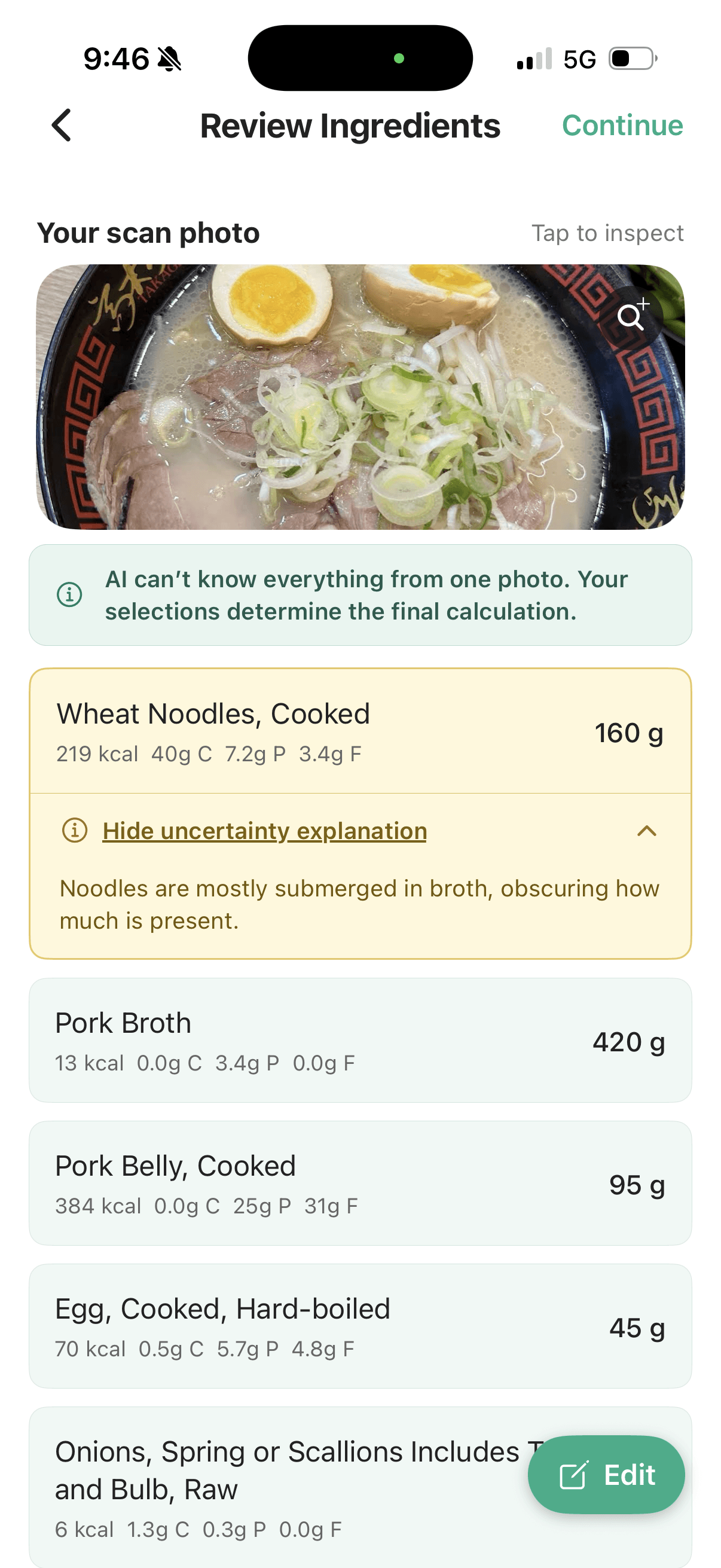
The main foods are easy to recognise here. The review lists skinless cooked chicken breast, cooked white rice, cucumber, and coriander. There is no ingredient-identification correction to walk through, but the oil still needs a look.
 The visible ingredients are recognised; the oil entry is marked for review.
 The explanation: rice may be oil-seasoned, but the retained fat is not directly visible and its amount is hard to judge.
That is a useful distinction. A clear photo can make the food identity straightforward without revealing how the rice was cooked. Here, the app uses a plain cooked-rice entry and a separate oil estimate. Check whether that combination fits the preparation you actually ate, and adjust it if you have better information.
 The meal-summary screen shows the calorie and macro estimate to review before saving.
The summary shown has different totals from the ingredient quantities visible in the review screens, so it isn't a before-and-after calculation of an unchanged list. The useful takeaway is the review itself: confirm the obvious ingredients, check the less visible preparation, then check the final serving and totals.
Bak chor mee: overlapping ingredients and a real mistake
 The harder example: ingredients overlap and the noodles and sauce sit beneath the toppings.
This bowl is closer to the challenge of a hurried meal photo: mixed textures, partly hidden ingredients, and a round white item that can be misread.
The initial review flagged several ingredients, including pork liver and fish cake. It also identified the fishball as a hard-boiled egg. The egg entry was replaced with fishball; the other ingredient identities were accepted after review.
 The initial result. The fishball was mistakenly listed as a hard-boiled egg.
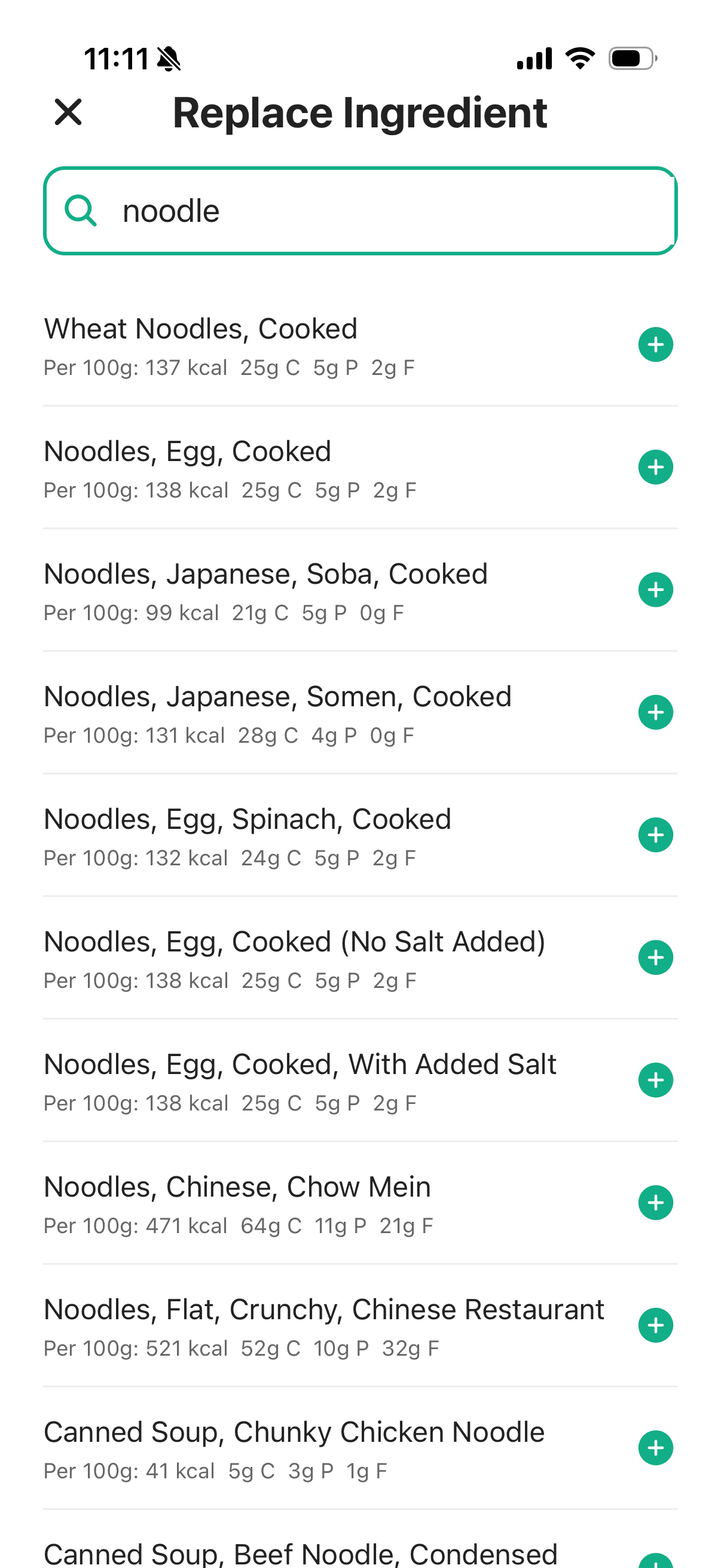
 The correction begins by searching for the ingredient that was actually present.
The mistaken egg wasn't marked amber in the visible list. That is an important detail: flags help direct attention, but they cannot replace a quick check of the whole meal.
Once the replacement is selected, the editable list shows Fish Balls. The remaining screens preserve the other ingredients for review.
 The fishball correction is now in the ingredient list.
 The rest of the bowl still deserves a look, including the sauce entry.
An uncertainty flag does not necessarily mean an ingredient is wrong. In this example, the other ingredient identities were accepted after review. Conversely, a correctly named ingredient can still have an uncertain portion. Replacing the egg corrects the food match; it doesn't measure the fishball's weight.
 The final displayed estimate after the ingredient review.
 The app also offers interpretation of the meal. Those suggestions depend on the underlying estimates.
The insights screen is another layer of interpretation, not additional evidence that the quantities are correct. Its usefulness depends on the meal inputs and the person's goal. The practical achievement here is simpler: an observable mistake was corrected before saving.
The missing information may be outside the bowl
Even a recognisable meal leaves open questions about what you ate. Did you finish the sauce? Was the drink yours? How much rice remained?
The same problem is easy to see in this separate meal photo:
 Sauce served is not necessarily sauce consumed. The photo cannot tell us how much will be left.
It isn't hawker food, but the logging decision is the same as with chilli sauce or gravy at a stall. The cup could be finished, shared, barely touched, or left alone. Record the portion you used when you know it; don't automatically assign every visible item to your intake.
In NutriLab, that correction can happen in the ingredient list. Here, the sauce starts as a 45 g mayonnaise estimate. Editing it to 20 g changes the displayed contribution from 306 to 136 kcal.
 Before editing: the sauce is estimated as 45 g of mayonnaise, with its identity flagged as uncertain.
 Editing the portion to 20 g changes this entry's displayed estimate to 136 kcal.
The sauce type is also flagged as uncertain. Changing the grams addresses the portion; choosing a better food match is a separate check.
For more on that, see why portions, sauces, and oils can change a meal's estimate.
Choose a routine you can keep using
Use a matched dish entry when a rough approximation is enough. Build ingredients manually when you have useful detail. Reuse a saved meal when the order is familiar. Use a photo when it makes starting the log easier, then correct what you know.
Whichever method you choose, spend attention on the differences that matter to your order: the main portion, protein, preparation, and extras. A convenient tool is valuable when it helps you keep those details, not when it persuades you that every plate with the same name is identical.
Our guide to AI scanner accuracy examines the trade-offs in more depth, including why both human estimates and photo estimates need checking.