How to correct portions, sauces, and oils after a food scan
Why similar-looking meals can have different calories, how to account for portions and hidden extras, and a visual guide to correcting a scan.
Put two similar bowls of pasta next to each other. Give one an extra 20 g of oil. The second bowl may not look dramatically larger, but that addition contributes roughly 180 extra calories.
That is a worked illustration, not a measurement of the meals pictured below. It uses the general nutrition-labelling factor of about 9 kcal per gram of fat. FDA food-labelling guidance.
This is why food logging can feel surprising. We tend to notice the large things: the chicken, rice, or noodles. An extra coating of oil, a creamy dressing, or a sauce stirred through the food may be less visible while still changing the total.
A better estimate starts by understanding those differences. The same checks apply whether you enter the meal manually or ask a scanner to prepare the first draft.
Similar appearance does not mean similar nutrition
A photograph records surfaces and shapes. It doesn't record a recipe.
One cook may use a little oil to coat a pan; another may finish the dish with more. Two sauces can have similar colours and different ingredients. Two apparently similar bowls can hold different quantities because one is deeper or its contents are packed more tightly.
There are also differences between what was prepared, what was served, and what was eaten. Oil left in the pan is not automatically part of your portion. A cup of sauce on the tray is not proof you finished it. A serving shared between two people does not belong entirely in one person's diary.
These are separate questions. Recognising the name of the dish doesn't answer them, and matching its appearance to a familiar meal doesn't make them disappear.
The most useful review focuses on information you can actually add: a known recipe, a measured portion, a specific order, or what remained after eating.
Why oils deserve their own check
Oil is easy to miss because a relatively small quantity can contribute meaningful energy without adding much bulk. That extra 20 g in the opening example can disappear into a dish much more easily than a large extra serving of pasta.
There are two things to check: which cooking fat is represented and how much belongs to your serving. Seeing a sheen doesn't establish whether the cook used olive oil, butter, or a blend. Knowing that oil was used doesn't tell you the exact amount you consumed.
If you cooked the meal, use the recipe and the amount allocated to your portion. If you divide a recipe evenly, you have a basis for dividing its ingredients; if substantial sauce or fat remains behind, recognise that dividing everything equally is still an approximation.
At a restaurant, the amount may simply be unknown. Choose a preparation that reasonably matches the dish, ask if practical, or keep a defensible estimate. Inventing a precise quantity is not an improvement just because it looks more scientific.
Also inspect the entry you selected. If it already describes food cooked with oil, adding a second allowance for the same oil can double-count it. A plain ingredient and a prepared dish require different treatment.
Sauces have a served-versus-eaten problem
A sauce can be visible and still be difficult to log. You need its composition, the serving amount, and how much you used.
 The cup is visible. The photo does not tell us its exact recipe or how much of it was eaten.
This photo makes the problem concrete. Someone could use the entire cup, half of it, or a few dips. All three outcomes begin with the same photograph. The visible drink also needs its own check: you cannot reliably determine its sugar content from its colour.
When a sauce has a label or published nutrition information, scale that information to the amount used. For example, if a label states 120 kcal per 30 g and you eat 15 g, the corresponding estimate is 60 kcal. Those are hypothetical label values, not an identification of the sauce in this picture. The FDA's guide to serving sizes explains how calorie and nutrient figures change with the amount consumed.
If you don't know the brand or recipe, a generic sauce entry is an approximation. Don't assume all dressings, gravies, or chilli sauces are interchangeable. And if sauce is already mixed into a prepared-dish entry, check before logging it again separately.
For sauces on the side, a quick look at what remains after the meal may tell you more than another analysis of the original photo.
Portions still matter even when the ingredients are right
It is possible to identify every food correctly and still have an inaccurate total. The amount matters too.
Check the large components first: the rice or noodles, the main protein, and any substantial sides. Then look at concentrated extras such as oil and dressing. For a calorie estimate, debating a tiny garnish may be less useful than resolving an uncertain main portion or cooking fat.
Use measured amounts when you have them. Match cooked weights to cooked entries and dry weights to dry entries. If you shared a dish, log your share; if you left some behind, account for that rather than treating the whole plate as consumed.
For an unfamiliar meal, the best possible record may still contain estimates. Your objective is to improve the parts you can check, not to manufacture certainty about every gram.
How those checks look in a food scanner
Once those principles are clear, an editable scanner becomes a practical way to apply them. It can draft the ingredient list and quantities so you don't have to enter everything from scratch.
The following NutriLab alpha screens show separate examples of that process. They illustrate how to inspect and change a log; their nutrition values are app estimates.
Noodles: the food is visible, but the quantity is not
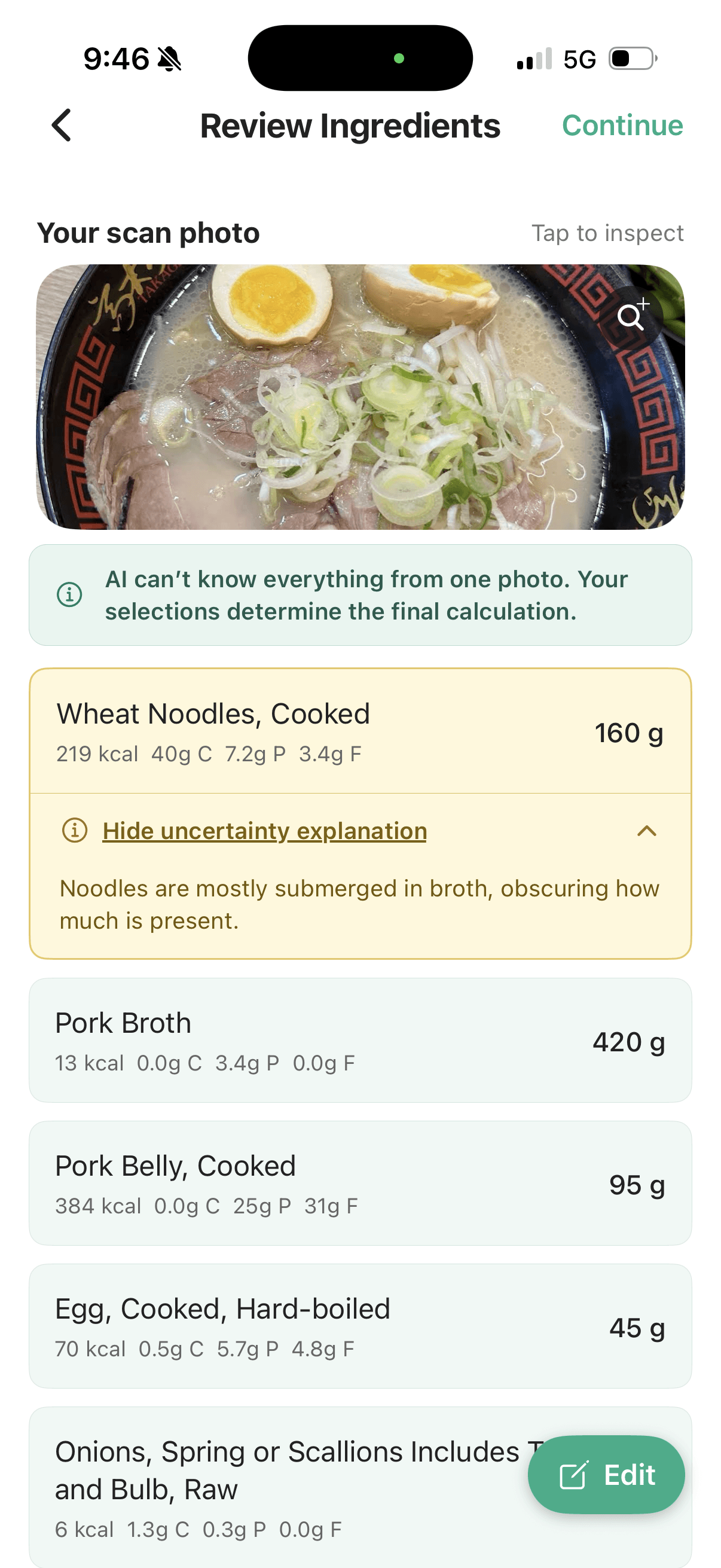
 The actual noodle review screen: broth hides how much of the noodle portion is present.
The screen proposes a cooked-noodle entry and flags the amount because much of it is submerged. That is a specific, useful limitation to surface. A clear photograph of the bowl's surface wouldn't necessarily reveal the missing depth.
If you know the noodle amount, adjust it. If you know the type is wrong, replace the entry. If neither is known, keep the distinction between a reasonable estimate and a measured portion.
Replacement: check the food before refining its weight
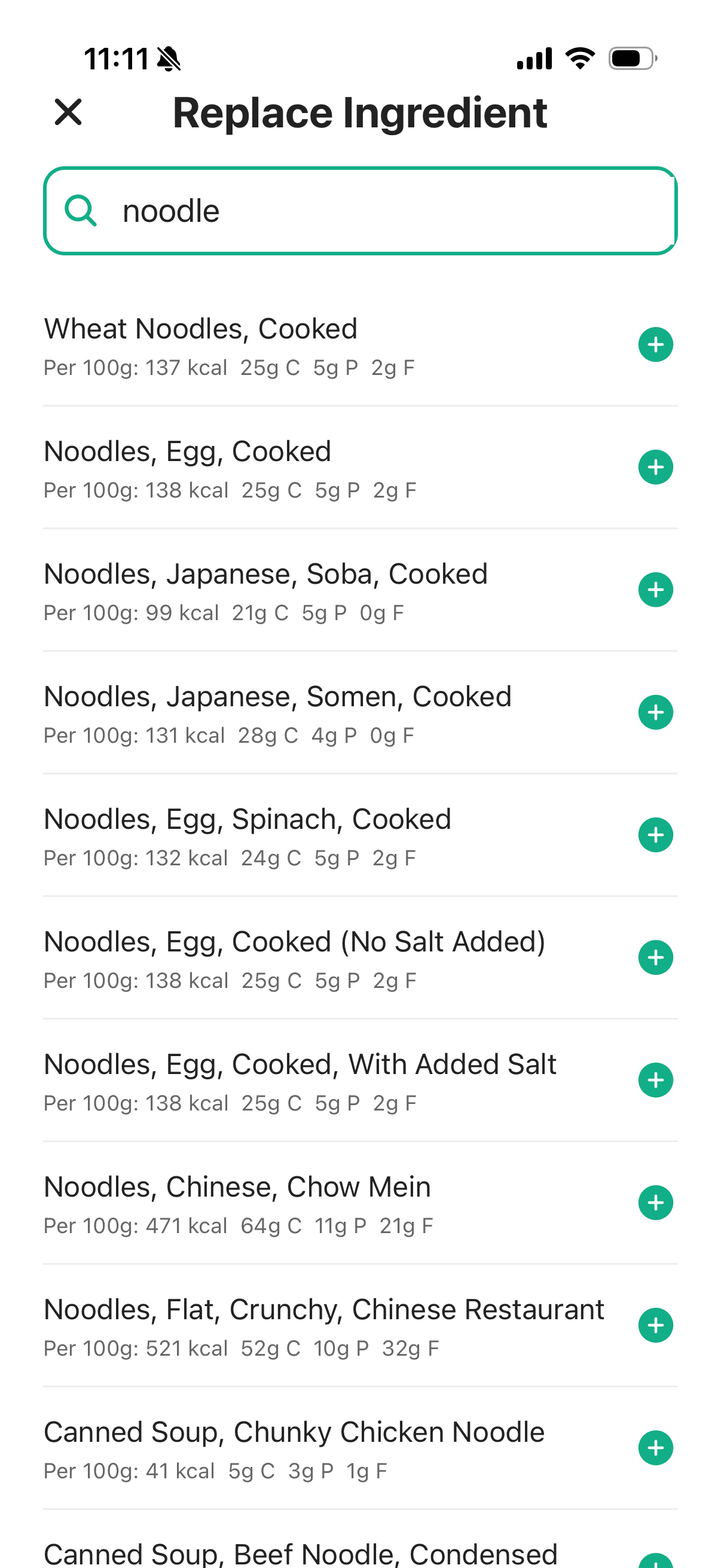
 The replacement search lets you choose an entry that fits the actual food and preparation.
The search results include different noodle entries. Select the one that best describes your meal, rather than the first familiar word or the lowest calorie number.
Food identity and portion are two different corrections. Changing wheat noodles to the correct noodle type doesn't establish their weight. Adjusting the grams doesn't fix an unsuitable food entry.
Oil: a small row can have a large effect
 The oil is explicitly flagged because the visible coating does not establish the amount.
In this screen, the app assigns 88 kcal to its 10 g oil estimate, while the small basil entry contributes about 1 kcal. Those are displayed estimates, but they show why the oil row deserves attention when checking the calorie total.
The explanation points to a visible coating and uncertainty about the amount. It doesn't prove that olive oil was used. If you know it was butter, or know the quantity from cooking, that is information you can bring to the correction.
This is also why we wouldn't tell you to edit only amber rows. An unflagged entry can still be wrong. Start with the warnings, then give the entire list a quick comparison with the meal.
Sauce: add what the photo cannot know
Return to the sauce cup pictured earlier. After reviewing the food, check whether the logged sauce matches what you used. If the whole cup was assumed and you ate only part, change the portion. If a generic entry doesn't fit the sauce you know you had, choose a closer match.
The screens below show that portion edit. The initial sauce entry is 45 g of mayonnaise at 306 kcal. Changing it to 20 g brings the displayed estimate to 136 kcal: a 170 kcal difference from editing one row.
 Before editing: the sauce is estimated as 45 g of mayonnaise, with its identity flagged as uncertain.
 Editing the portion to 20 g changes this entry's displayed estimate to 136 kcal.
The app also flags uncertainty about the sauce type. The quantity edit leaves the mayonnaise match in place; if you know it was a different sauce, replace that entry too. These screens show how to make the correction, rather than establish how much was actually eaten.
A person can provide that context to an AI-assisted log or a manual one. The tool is helpful when it makes the correction easy.
Finish with a check of the total
 A separate meal-summary example. Check the inputs and serving before saving.
Review the ingredients and serving once more before saving. Look for duplicates, a replacement that didn't match what you intended, or a portion that still describes the whole shared dish.
A useful order is: food match, main portions, oils and sauces, amount actually eaten, then the total.
That routine addresses the sources of difference that a dish name or a photograph can conceal. It works with a scale and a manual diary, and it works with a photo-generated draft.
For another example, our hawker-food guide follows a chicken-rice scan and a bak-chor-mee correction. For the broader question of what a photo can establish, read how accurate AI food scanners are.